How to use Purdue AF
Basic interface components
JupyterLab provides an interactive interface for general code development. The screenshot below shows the main elements of the interface:
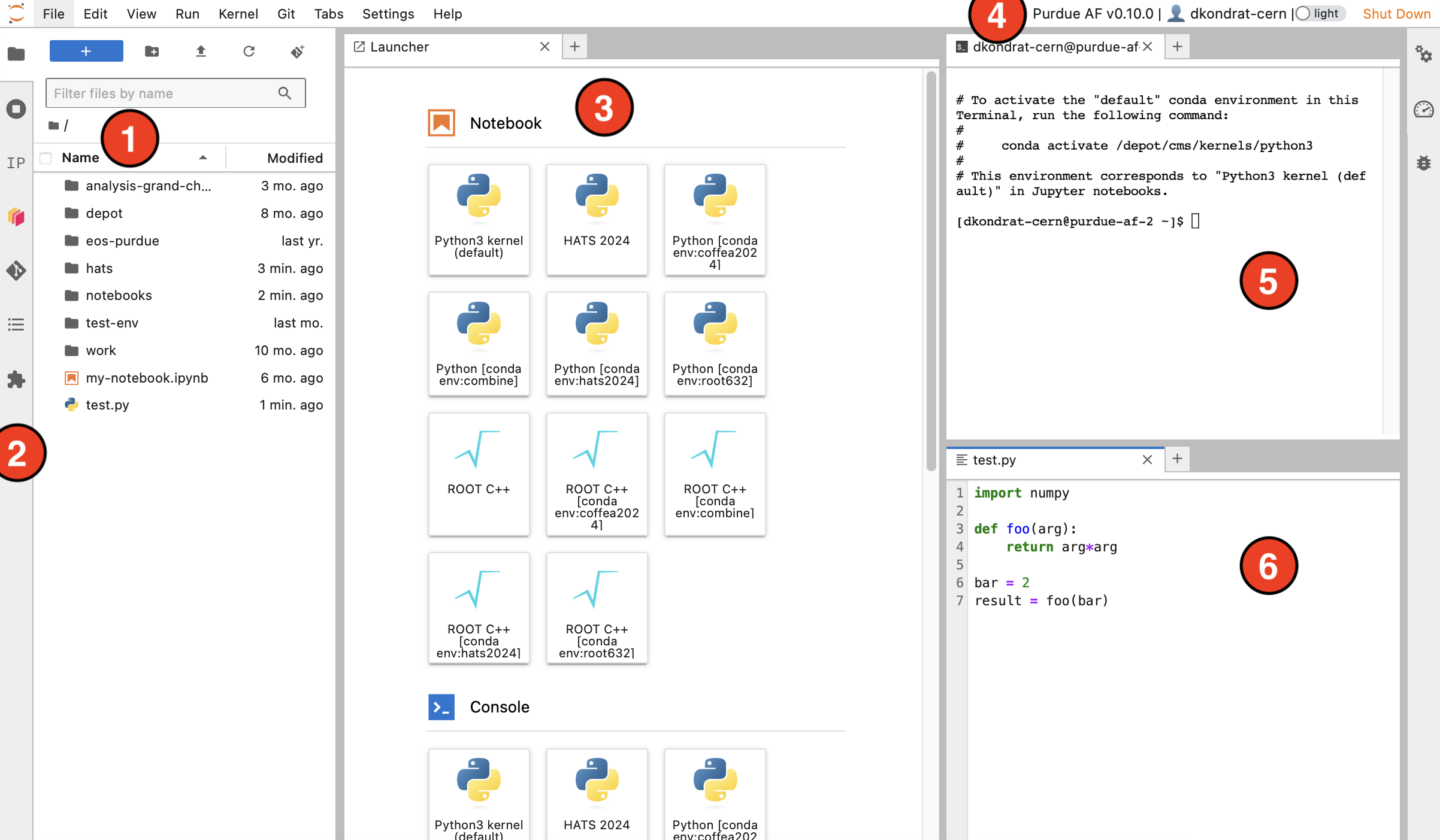
File browser - your home directory with symlinks to different storage volumes (Depot, CVMFS,
/work/, etc. - learn more here).Exstensions - left sidebar contains useful extesions, such as a Git extension for interactive work with GitHub or GitLab repositories.
Launcher - features buttons to create Python and ROOT C++ notebooks with different Pixi or Conda environments, open terminals, create new text files, etc. New launcher window can be opened by clicking the
+button in the file browser or next to any open tab.Top bar - contains Purdue AF release version, your username, dark theme switch, and the shutdown button.
Terminal - standard Bash terminal, useful for any cases that require a command line interface.
File editor - simple IDE with syntax highlight for most common programming languages.
Note
Windows with terminals, editors, etc., can be rearranged. The window layout is preserved when you shut down and restart the AF session.
Other User Interfaces
In addition to JupyterLab, Purdue AF provides other user interfaces for analysis development.
Web-based Visual Studio Code (code-server) interface
To open the web-based VSCode interface, click on the button with VSCode logo
 in the JupyterLab Launcher (the button is not shown in the screenshot above).
Python code development
JupyterLab is especially well suited for developing analysis workflows in Python.
Jupyter Notebooks allow to write analysis code as a sequence of code and text cells, which can be executed in arbitrary order. In many cases, a single Jupyter Notebook can accomodate a full analysis from data access to producing final plots.
Jupyter Notebooks support a wide range of plugins and widgets, which allows for a more interactive experience comparing to simple Python scripts.
To execute the code in a Jupyter Notebook, we always need to specify a kernel. At Purdue AF, Jupyter kernels are derived from Pixi or Conda environments. Read more here.
We provide a curated “global” Pixi environment, which should work for most applications, unless your code relies on a very specific package version.
Analysis code written in Python can be accelerated via parallelization. We recommend using Dask for parallelization and distributed computing. For scaling out to multiple computing nodes, consider using Dask Gateway.
ROOT
ROOT is a software package developed by CERN and widely used in high energy physics for histogramming, fitting, and statistical analysis.
ROOT console can be launched from a terminal by typing
root -l. Note that it is not possible to display canvases or openTBrowseras JupyterLab interface does not support X11 forwarding.Alternatively, you can turn a Jupyter Notebook into a ROOT console by selecting the ROOT C++ kernel. Similarly to Python notebooks, you can add text cells and execute cells in arbitrary order.
When working from a Jupyter Notebook, you can display ROOT plots using
TCanvas::Drawmethod.The pre-installed ROOT C++ kernel supports CUDA backend for RooFit. To use it, pass
RooFit::EvalBackend("cuda")argument tomodel.fitTo().In Python, ROOT functionality is accessiblae via PyROOT package, present in the default kernel.
HEP analysis frameworks
We aim to support a wide range of modern HEP analysis tools. Below are a few examples of frameworks which have been shown to perform well at Purdue AF:
Coffea is a popular Python package for efficient columnar particle physics analyses. Coffea implements all common tools used in modern HEP analyses, and has a large and active support community.
The latest version of Coffea is pre-installed in the global Pixi environment at
/work/pixi/global/.PocketCoffea is a slim declarative framework built on top of Coffea. It allows to define an analysis with a few configuration files. A PocketCoffea analysis can be executed in a distributed way using dask@purdue-af executor which is based on Dask Gateway.
RDataFrame is another common HEP analysis framework based on ROOT. RDataFrame analysis can be written in either C++ or Python. Purdue AF supports RDataFrame in any Pixi or Conda environment where ROOT is installed.
Scaling out
Slurm is a job scheduler and workload manager that enables batch submission on Purdue computing clusters. At Purdue AF, users with local Purdue accounts can submit jobs from Purdue AF to
cmsqueue.Dask is an open-source library for parallel computing in Python. It can be used to quickly parallelize any Python code, or implicitly as a backend in frameworks such as Coffea and RDataFrame.
At Purdue AF, we host Dask Gateway servers, which allow users with both local and external (CERN/FNAL) accounts to scale out beyond local session resources.
CRAB (CMS Remote Analysis Builder) is a utility to submit CMSSW jobs to distributed computing resources. CRAB allows users to:
Access Data and Monte Carlo datasets stored at any CMS computing site worldwide.
Exploit the CPU and storage resources at CMS computing sites via Worldwide LHC Computing Grid (WLCG).
CRAB is suitable for running most CMSSW framework jobs (i.e. jobs launched via the
cmsRuncommand). It is recommended to use CRAB for computationally intensive jobs, such as Monte Carlo generation or “skimming” AOD / MiniAOD datasets.
GPUs
At Purdue AF, you can start a session with a GPU by specifying it at resource selection step.
We have a limited number of Nvidia A100 GPUs, which are available in two configurations:
Configuration |
Memory |
Number of instances |
Full A100 GPU |
40GB |
4 |
5GB “slice” of A100 |
5GB |
14 |
See more info here: GPU access at Purdue AF.